


Sportsbox 3D Golf
1.932.00 Reviews
App Specs
- Version
- 1.22.0-8-release
- Updated On
- License
- Free
- Downloads
- 10,000+
- Developer
- Sportsbox.ai
- Categories
- Sports
- Platform
- Android
Screenshots
 Analysis by AppCompare
I judge a golf-training app by whether it helps me notice something concrete about my swing, then gives me a sensible way to work on it. Sportsbox 3D Golf is built around that idea: it turns a phone recording into a three-dimensional view of body movement, which can make technique easier to inspect than a quick glance at a mirror or a single video angle. I would treat it as a practice aid, not a replacement for a coach or a promise of instant improvement.
That distinction matters for golfers with different experience levels and needs. A beginner may appreciate seeing how body motion relates to a swing, while a more experienced player may use the visual feedback to investigate a recurring movement. But interpreting any analysis takes patience, and the app’s camera-based approach is most useful when the golfer can set up a clear recording and move safely. It is not automatically the right fit for every body, phone setup, or practice environment.
The Ultimate Golf Companion
As soon as I opened the app, I was impressed by the sleek design and user-friendly interface. Navigating through the features is as smooth as a perfect swing. But what really caught my eye was the ability to analyze my swing in 3D. I mean, how cool is that?
Readability and navigation
For a golfer who is comfortable exploring an app, the central idea is easy to grasp: capture a swing, review the movement, and use the results to guide practice. That sequence is more helpful than a screen full of unrelated golf advice because it gives the session a purpose. I would still avoid trying to interpret every visual detail at once. Pick one movement to examine, make a note of what you noticed, and leave the rest for another session; that keeps the analysis from becoming a distracting pile of information.
The app is a sports tool from Sportsbox.ai, and its 3D emphasis makes it different from a basic swing-video recorder. A conventional camera clip is often quicker to share or replay, but it leaves the viewer to judge movement from the angles available. Here, the appeal is a more structured look at body motion. That extra perspective can be useful, although it also asks more of the user: visual feedback is not the same as knowing which adjustment is safe or appropriate for your swing.
Features You’ll Love
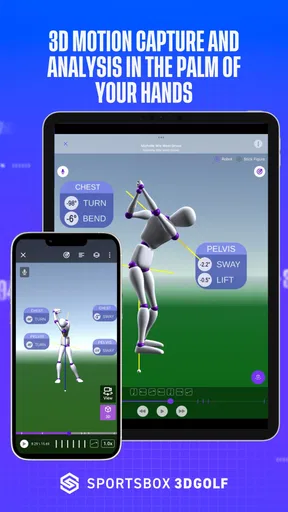
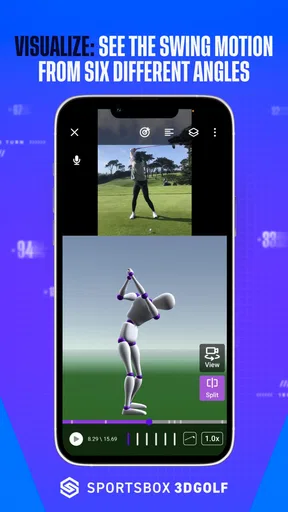
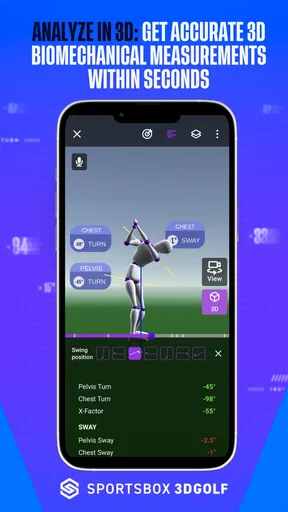
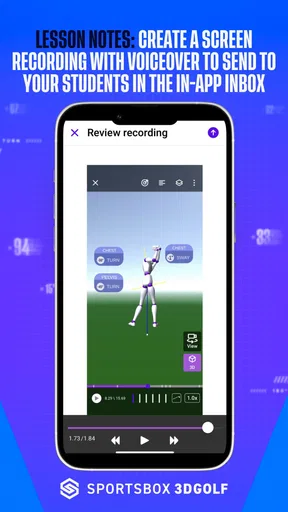
Let's dive into the goodies. First off, the 3D motion capture technology is top-notch. It uses your phone's camera to track your swing and provides detailed feedback. You can see every angle, every twist, and every turn of your body. It's like having a coach with superpowers!
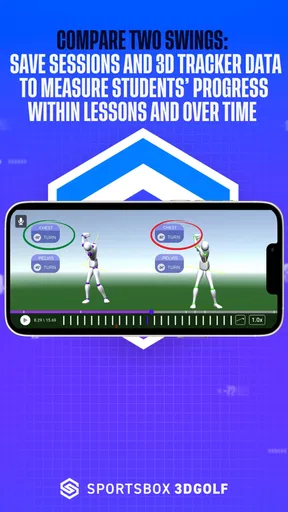
Another feature I can’t stop raving about is the comparison tool. You can compare your swing with professional golfers. I spent hours analyzing how my swing stacks up against the pros. Spoiler alert: I've got some work to do!
Worth Reading Before You Choose

Flipboard Shows What News Apps Must Do Beyond the Feed

Switching to Android Auto Means Rethinking Your Driving Routine

Google Calendar Makes a Crowded Week Easier to Manage

Ludo King Makes the Most of the Minutes Between Plans

Baby Panda World Brings Quick Play to Modern Phones, but Its Game Library Feels Busy

ESPN’s Live Game View Makes Following Close Games Easier
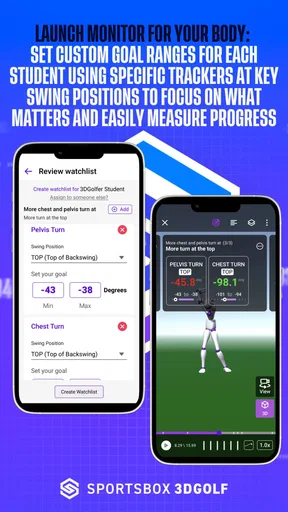
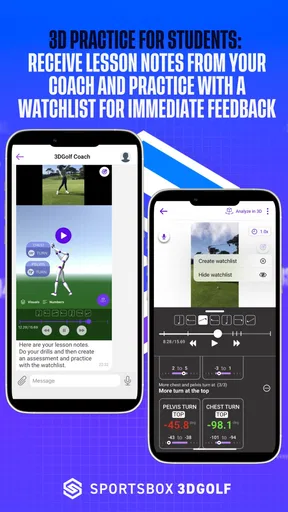
The app also includes a library of drills and tips from professional coaches. These are not just any drills; they are personalized based on your swing analysis. It's like having a tailored training program without the hefty price tag.
Motor and sensory considerations
A camera-based swing review is not a hands-free or movement-free experience: you need to arrange a recording, make a golf motion, and then look closely at the results. For someone with limited balance, pain, fatigue, or restricted range of motion, I would start with small, comfortable movements rather than trying to reproduce a full swing just to satisfy an analysis. The app can support observation, but it cannot decide whether a movement is suitable for your body. If a movement causes discomfort, stop and seek guidance from a qualified professional instead of chasing a visual match.
There is also a practical sensory trade-off. A 3D representation may make body movement easier to inspect than a flat clip, but more visual detail can feel busy if you are already unsure what to focus on. I find it useful to set a single question before reviewing a recording—for example, whether my posture changes through the motion—rather than scanning every angle. Comparing yourself with a professional can inspire a question, but it should not turn into pressure to copy a body or movement pattern that is not yours.
Getting Started
Setting up Sportsbox 3D Golf is a breeze. Once you download the app, you create a profile, and you're good to go. The app guides you through the setup with easy-to-follow instructions. Even if you're not tech-savvy, you'll have no problem getting started.
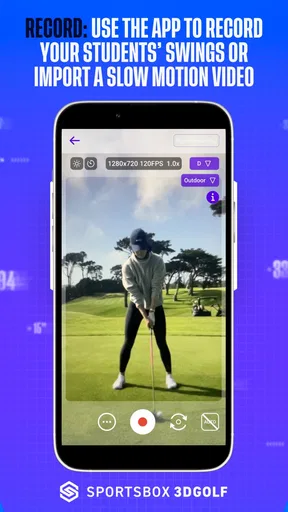
For the best results, make sure you have good lighting and enough space to swing freely. The app does a great job of guiding you through the setup process to ensure the camera captures your swing accurately.
Situational access and a useful practice routine
In everyday use, I would make the recording part of a short, deliberate practice session rather than trying to analyze every ball at the range. For example, after work I might set aside a few minutes in a clear, well-lit space, record a comfortable swing, and review one point before moving on to ordinary practice. This makes the app’s analysis a prompt for attention, not a reason to keep repeating a movement until the screen looks perfect.
Location matters. The setup guidance makes clear that usable space and lighting are important, so a crowded room, dim corner, or busy practice area can make the process awkward. If you cannot safely swing where you are, a standard video review or written notes may be the better choice that day. A tripod or stable phone position can also help keep a recording consistent, though the key is following the app’s own capture instructions rather than assuming any camera angle will work equally well.
Before relying on the analysis, I would check the phone’s compatibility and the current app requirements. The Android version shown is 1.22.0-8-release and requires Android 10 or later. The app is free to install, with in-app purchases ranging from $15.99 to $189.99 per item, so I would look at the available options in the app before building a routine around paid material. It is rated for Everyone, which describes its content rating, not whether every physical exercise or use situation is suitable for every person.
Remaining barriers and honest trade-offs
The main limitation is that a detailed analysis can look more authoritative than it really is. A 3D view helps me inspect movement, but it does not automatically explain why a swing is inconsistent, account for every physical difference, or replace feedback from someone who can watch me in person. New golfers may need help turning observations into a simple drill, while experienced golfers may find that a coach’s context is more valuable than another layer of self-analysis.
There is also a learning curve in using comparisons wisely. A professional golfer’s movement is a reference point, not a template for every player. I would compare only the part of the swing I am working on, then test one manageable change rather than attempting to imitate an entire motion. That approach reduces the risk of overcorrecting and makes it easier to tell whether practice is helping.
The app has an average rating of 2.0 from 92 ratings, with 31 written reviews, and has been installed over 10K times. I would take that modest rating as a reason to keep expectations measured, not as proof that the analysis concept has no value. The developer is Sportsbox.ai, and the app has been available since November 18, 2021. What matters most to me is whether its capture workflow and feedback suit your own phone, practice habits, and tolerance for reviewing technique.
Why You Should Try It
If you're serious about improving your golf game, this app is a must-try. The insights and feedback you receive are invaluable. You'll find yourself hitting the green more often and with greater confidence.
Not to mention, the app is constantly updated with new features and improvements. The developers seem really committed to making this the best golf app out there.
I would recommend giving it a try if you enjoy studying your own technique, have somewhere appropriate to record, and are willing to treat the output as a starting point for practice. It may be less satisfying if you want a simple scorecard, course information, or a quick video you can share without interpreting movement. Those familiar golf utilities solve different problems; this one is specifically about looking at the swing. If your main goal is to improve through live correction, a golf instructor is the more direct option.
Inclusive verdict
In conclusion, Sportsbox 3D Golf is an absolute gem for golf lovers. It's packed with features that make improving your game both fun and informative. Whether you’re looking to shave a few strokes off your handicap or simply enjoy the sport more, this app has you covered.
You can download it from the App Store or Google Play, and trust me, you won't be disappointed. So grab your clubs and your phone, and take your golf game to the next level!
My more measured recommendation is to try it when you have a clear practice goal, then judge it by whether the analysis helps you make one useful decision—not by how many details it displays. Its strongest fit is a curious golfer who wants a more structured look at body movement and can practise in a suitable space. If screen-heavy review, camera setup, or physical swinging is a poor match for your circumstances, a coach, a simpler recording method, or non-swing golf tools may serve you better. That balance is what makes the app worth considering without treating it as a universal solution.
Pros
- Accurate swing analysis for all skill levels.
- User-friendly interface with easy navigation.
- Comprehensive tutorials for beginners.
- Real-time feedback to improve your game.
- Supports multiple devices for versatility.
Cons
- Requires a stable internet connection.
- Limited features in the free version.
- High battery consumption during use.
- Occasional bugs with older OS versions.
- Subscription model may be costly for some.
FAQs for Sportsbox 3D Golf
What is Sportsbox 3D Golf and how does it work?
Sportsbox 3D Golf is an innovative app designed to improve your golf skills by providing 3D swing analysis. Users can record their swings using their smartphone camera, and the app converts this into a 3D model. It evaluates your technique and provides insights to help enhance your performance.
Is Sportsbox 3D Golf suitable for beginners?
Yes, Sportsbox 3D Golf is ideal for golfers of all levels, including beginners. The app offers easy-to-understand feedback and tips, making it accessible for those just starting out. Beginners can use the app to learn the basics of a proper swing and track their progress over time.
What devices are compatible with Sportsbox 3D Golf?
Sportsbox 3D Golf is available for both Android and iOS devices. It requires a smartphone or tablet with a camera to capture swing videos. Ensure your device meets the app's technical requirements for optimal performance, which can be found on the app's download page.
Are there any subscription fees for using Sportsbox 3D Golf?
Sportsbox 3D Golf offers a variety of subscription plans, including a free version with limited features. For more advanced analysis and additional features, users can opt for a paid subscription. Pricing details and features included in each plan are available on the app's official website.
How accurate is the swing analysis provided by Sportsbox 3D Golf?
The swing analysis in Sportsbox 3D Golf is highly accurate, utilizing advanced algorithms to deliver precise feedback. However, factors like lighting and video quality can affect accuracy. Users are encouraged to follow best practices for recording swings to ensure the most reliable analysis.


